
pyscripter logo
# PY

PyScripter Free Python IDE for Windows

PyScripter is a powerful and open-source Python IDE designed specifically for Windows users who want a fast, lightweight, and efficient development environment. Whether you are a beginner learning Python or an experienced developer working on advanced projects, PyScripter provides all the essential tools needed to write, test, and debug Python code with ease.

Smart Syntax Highlighting Editor

Smart Syntax Highlighting Editor

Experience a fast and intelligent code editor designed for Python developers. PyScripter offers advanced syntax highlighting that makes your code more readable and error-free.
Fast & Reliable Remote Debugger

Built-in Python Execution Environment

Run your Python scripts instantly with PyScripter’s integrated interpreter. No need for external tools — write, execute, and test your code directly in one place.
Modern GUI with docked forms

Professional Debugging Tools

Debug your Python projects like a pro with powerful built-in debugging tools. Set breakpoints, inspect variables, and track code execution step-by-step.
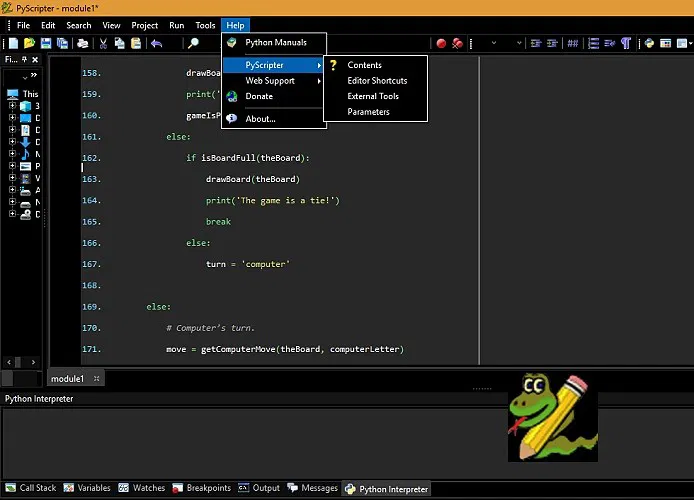
What you get with PyScripter
What we say..

What You Get with PyScripter

PyScripter is a powerful yet lightweight Python IDE designed specifically for Windows users who want speed, simplicity, and performance in one place. Built to deliver a smooth coding experience, it combines advanced development tools with a clean and responsive interface.

0 k+

Downloads by Developers

0 +

Built‑in Python Development Tools

0 k+

Active Python Developers Using It

0

Years Supporting Python Development

How to Download PyScripter (Step-by-Step Guide for Windows 2026)

If you’re looking for a powerful and lightweight Python IDE, PyScripter is one of the best free options available for Windows users.

Step 1: Download PyScripter Installer

First, visit the official download page and get the latest version of PyScripter for Windows.

Make sure you:

  • Choose the latest version
  • Download from a trusted source
  • Select the correct version (32-bit or 64-bit)

Step 2: Start the Installation Process

Once the file is downloaded:

  • Open the installer file
  • Click Next to begin installation
  • Choose your installation location (or leave default)

You will also see optional settings like:

  • Create Desktop Shortcut
  • Add Quick Launch Icon
  • Add “Edit with PyScripter” to right-click menu

Select these options based on your preference.

Step 3: Complete Installation

Click the Install button and wait for the setup to finish.

After installation:

  • Tick Launch PyScripter
  • Click Finish

The software will open automatically.

Step 4: Configure Python Environment

When PyScripter opens for the first time, you need to connect it with your Python environment.

  • Look at the bottom bar and click on Python version (e.g., Python 3.x 64-bit)
  • A new window will open showing available environments

If your environment is not listed:

  • Click the + (Add) icon
  • Navigate to your Python installation folder
  • Select the environment and add it manually

Step 5: Activate the Environment

  • Double-click your selected Python environment
  • If any warning appears, simply confirm it

Once activated, you’ll see a marker or arrow indicating it is active.

Step 6: Verify Setup

Make sure:

  • Your selected Python version is active
  • No errors are showing

Then close the settings window.

Step 7: Restart for Best Performance

For better stability:

  • Close PyScripter
  • Reopen the application

This ensures all settings are saved properly.

Quality Services

Free, open source, feature-rich and lightweight Python IDEa

Smart Syntax Highlighting Editor

Integrated Python Interpreter

Run and test your Python scripts instantly using the integrated Python interpreter.
Fast & Reliable Remote Debugger

Fast & Reliable Remote Debugger

Debugging becomes simple with PyScripter’s advanced remote debugging system.
Built-in Unit Testing Support

Built-in Unit Testing Support

Ensure your code quality with integrated unit testing tools. Quickly validate your scripts.
Modern User Interface with Docking Panels

Modern User Interface with Docking Panels

Enjoy a sleek and customizable interface with modern GUI and dockable panels.
Fully Customizable IDE Settings

Fully Customizable IDE Settings

PyScripter offers persistent and configurable IDE options, allowing you to personalize your development environment.
Modern GUI with docked forms

Modern GUI with docked forms

Sleek modern GUI with docked forms for efficient and intuitive workflow.

Advanced Features of PyScripter

PyScripter is designed to deliver a complete and efficient development experience for Python users, whether you are a beginner or an advanced programmer. It comes packed with powerful tools that simplify coding, improve productivity, and make debugging much easier.

One of the standout features of PyScripter is its intelligent code completion system, which helps developers write code faster by suggesting functions, variables, and modules in real time. Along with this, call tips and real-time syntax checking ensure that errors are minimized while writing code, saving both time and effort.

FAQ Schema

PyScripter IDE FAQs for Python Developers

PyScripter is a fast, lightweight, and open-source Python IDE designed specifically for Windows users. It provides a complete development environment where programmers can write, edit, run, and debug Python code with ease. With its clean interface and powerful tools, PyScripter is suitable for both beginners and experienced developers looking for an efficient coding solution.

Yes, PyScripter is 100% free and open-source software. There are no hidden charges, subscriptions, or premium features. Anyone can download and use it for learning Python, building projects, or professional development without any limitations.

PyScripter comes packed with essential and advanced features that improve productivity, including:

  • Smart syntax highlighting for cleaner code
  • Built-in Python interpreter for instant execution
  • Advanced debugging tools (breakpoints, step execution)
  • Project and file management system
  • Customizable layout and interface
  • Code completion and auto-indentation

These features make PyScripter a reliable choice for efficient Python development.

Yes, PyScripter is highly beginner-friendly. Its simple layout and easy navigation allow new users to start coding without confusion. At the same time, it offers advanced tools that help beginners grow into professional developers.

Absolutely. PyScripter includes a powerful debugging system that allows developers to:

  • Set breakpoints
  • Track variable values
  • Execute code step-by-step
  • Identify and fix errors quickly

This makes debugging smooth and efficient, even for complex programs.

Yes, PyScripter supports multiple Python installations. You can easily switch between different Python versions installed on your system, making it ideal for testing and development across environments.

Compared to heavy IDEs, PyScripter is lightweight, fast, and resource-efficient. It delivers powerful features without slowing down your system, which makes it a preferred choice for developers who want speed and simplicity without compromising functionality.

Yes, PyScripter allows you to run Python scripts instantly within the IDE. Its integrated interpreter lets you execute and test your code in real-time without needing external tools.

About Us

PyScripter.net is a trusted platform providing information, guides, and download resources for PyScripter, a free and powerful Python IDE for Windows. We help developers explore tools for coding, debugging, and Python development.

Download the FREE PyScripter